





In many backend systems, it is common to implement workflows composed of multiple sequential processing steps. These workflows often involve transforming, validating, or enriching large amounts of data before producing a final result.
In one of our recent Java projects, we needed to implement a feature with a well-defined multi-step workflow. While the logic of the workflow itself was straightforward, the real challenge was not the algorithm – it was how to structure the project so multiple developers could work simultaneously without conflicts.
This article describes the architectural approach we used to design a scalable and collaborative workflow system using well-known design patterns.
The Problem
The new feature required implementing a sequential data processing workflow composed of several steps:
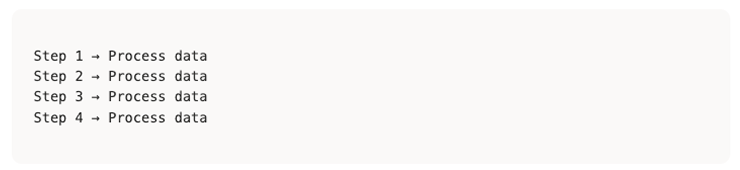
Each step had a specific responsibility and needed to process potentially large volumes of data.
Key requirements included:
- The workflow steps were well defined
- The processing needed to be sequential
- The system needed to handle large datasets efficiently
- The work needed to be split across multiple developers
In this particular case, the implementation was divided among two developers.
Without careful planning, this kind of setup can easily lead to:
- Git merge conflicts
- unclear ownership of code
- duplicated logic
- inconsistent implementations
The Goal: Enable Parallel Development
The primary architectural goal was to create a base structure that would allow developers to implement their parts independently.
To achieve this, the codebase needed:
- Clear abstractions
- Well-defined extension points
- Predictable execution flow
- Logical package organization
Instead of starting with concrete implementations, the approach was to first design the workflow skeleton, leaving clear extension points for the developers responsible for each part of the system.
Designing the Base Structure
The first step was creating a base workflow engine that defined how the steps should execute.
The idea was to make it obvious:
- which steps exist
- where developers should implement logic
- how the steps are executed
This allowed other developers to focus exclusively on their assigned steps.
Additionally, the project packages were organized in a semantically intuitive way, making components easy to locate.
Example structure:
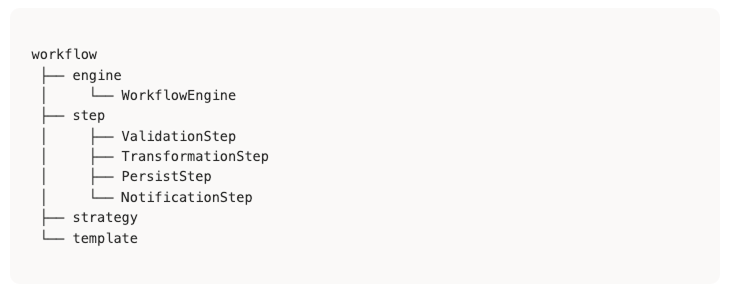
This structure makes the workflow self-documenting.
Applying Design Patterns
To make the architecture predictable and extensible, several design patterns were used. These patterns helped clearly define where developers should implement their logic and ensured that the workflow remained consistent even as new functionality was added.
The main patterns used were:
- Template Method
- Strategy Pattern
- Command Pattern
Template Method Pattern
Description
Defines the skeleton of an algorithm in a base class, allowing subclasses to override specific steps without changing the algorithm’s structure.
Why used in applications
Applications often need to process different types of data that follow the same general workflow:

The Template Method pattern eliminates code duplication by providing a common processing framework while allowing each data type to implement its specific handling logic.
Benefits
- Ensures consistent processing flow across all data types
- Reduces code duplication by centralizing workflow logic
- Makes it easy to add new data processors
- Enforces standard processing pipelines
Example
					public abstract class DataProcessorTemplate<InputData, OutputData> {

    public final void processData(ProcessingContext context) {
        if (!validate(context)) {
            return;
        }

        InputData rawData = fetchData(context);

        if (!preProcess(rawData, context)) {
            return;
        }

        OutputData processedData = transformData(rawData, context);

        persistData(processedData, context);
        postProcess(processedData, context);
    }

    protected boolean validate(ProcessingContext context) {
        return true;
    }

    protected abstract InputData fetchData(ProcessingContext context);

    protected boolean preProcess(InputData data, ProcessingContext context) {
        return true;
    }

    protected abstract OutputData transformData(InputData data, ProcessingContext context);

    protected abstract void persistData(OutputData data, ProcessingContext context);

    protected abstract void postProcess(OutputData data, ProcessingContext context);
}
Example implementation
@Service
public class CustomerDataProcessor
        extends DataProcessorTemplate<RawCustomerData, CustomerRecord> {

    @Override
    protected RawCustomerData fetchData(ProcessingContext context) {
        return new RawCustomerData();
    }

    @Override
    protected CustomerRecord transformData(
            RawCustomerData data,
            ProcessingContext context) {
        return new CustomerRecord();
    }

    @Override
    protected void persistData(CustomerRecord data, ProcessingContext context) {
        // persistence logic
    }

    @Override
    protected void postProcess(CustomerRecord data, ProcessingContext context) {
        // notification / audit logic
    }
}
Strategy Pattern
Description
Encapsulates different algorithms or business rules into separate classes that can be swapped at runtime.
Why used in applications
Benefits
Applications often need to process different data formats or apply different business rules depending on the data type.
Instead of complex if/else chains, the Strategy Pattern allows the system to dynamically select the correct processing logic.
- Eliminates complex conditional logic
- Makes it easy to add new processing strategies
- Allows runtime algorithm selection
- Improves testability
Example
					public interface DataParser<InputType, OutputType> {
    Predicate<InputType> condition();
    Function<InputType, OutputType> transform();

    default Optional<OutputType> parseIfApplicable(InputType input) {
        return condition().test(input)
            ? Optional.ofNullable(transform().apply(input))
            : Optional.empty();
    }
}
					@Component
public class EmailDataParser implements DataParser<RawMessage, EmailData> {

    @Override
    public Predicate<RawMessage> condition() {
        return message -> "EMAIL".equals(message.getType());
    }

    @Override
    public Function<RawMessage, EmailData> transform() {
        return message -> EmailData.builder()
                .recipient(message.getRecipient())
                .subject(message.getSubject())
                .build();
    }
}
					@Component
public class SmsDataParser implements DataParser<RawMessage, SmsData> {

    @Override
    public Predicate<RawMessage> condition() {
        return message -> "SMS".equals(message.getType());
    }

    @Override
    public Function<RawMessage, SmsData> transform() {
        return message -> SmsData.builder()
                .phoneNumber(message.getPhoneNumber())
                .content(message.getContent())
                .build();
    }
}
Command Pattern
Description
Encapsulates operations as objects, allowing them to be queued, scheduled, and executed independently.
Why used in applications
Applications often consist of multiple sequential operations such as:
- validation
- transformation
- persistence
- notification
Each operation can be represented as a command step.
Benefits
- Enables configurable workflows
- Allows step reordering
- Supports retries and failure handling
- Makes the system highly extensible
Example
					public interface ProcessingStep {
    String getName();
    void execute(ProcessingContext context);
}

@Component
@Order(10)
public class ValidationStep implements ProcessingStep {

    @Override
    public String getName() {
        return "VALIDATION";
    }

    @Override
    public void execute(ProcessingContext context) {
        // validation logic
    }
}
@Component
@Order(20)
public class TransformationStep implements ProcessingStep {

    @Override
    public String getName() {
        return "TRANSFORMATION";
    }

    @Override
    public void execute(ProcessingContext context) {
        // transformation logic
    }
}
Command invoker
@Service
public class ProcessingService {

    private final List<ProcessingStep> steps;

    public void executeProcessing(ProcessingContext context) {

        for (ProcessingStep step : steps) {
            log.info("Executing step: {}", step.getName());
            step.execute(context);
        }
    }
}
Conceptual Architecture
Below is a conceptual diagram showing how the different patterns interact within the processing pipeline.
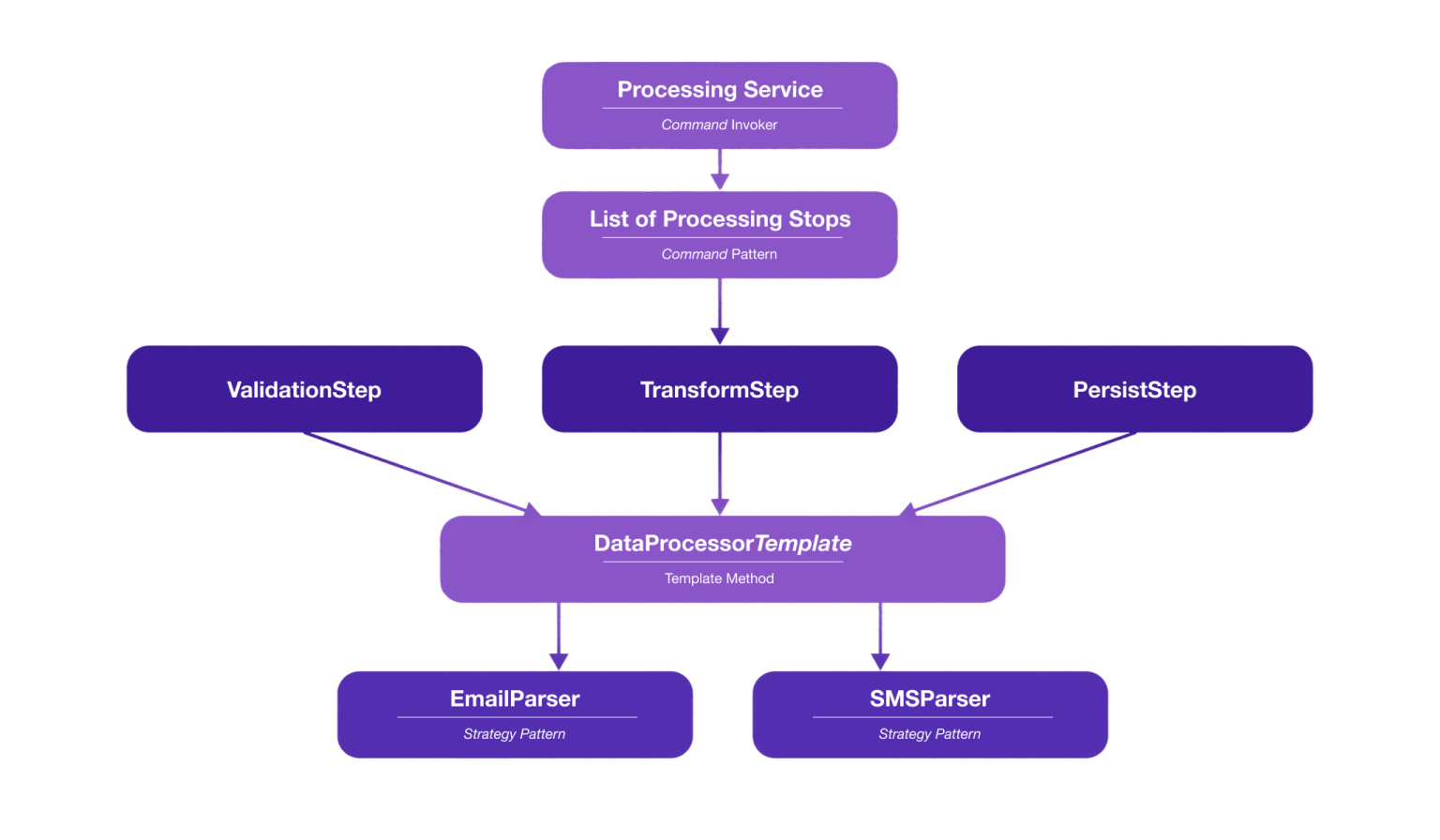
At a high level:
- ProcessingService orchestrates the execution
- ProcessingStep implementations represent commands
- DataProcessorTemplate defines the processing lifecycle
- Strategy implementations handle different data formats
End-to-End Example Flow
To illustrate how everything works together, imagine a system processing incoming messages from multiple channels.
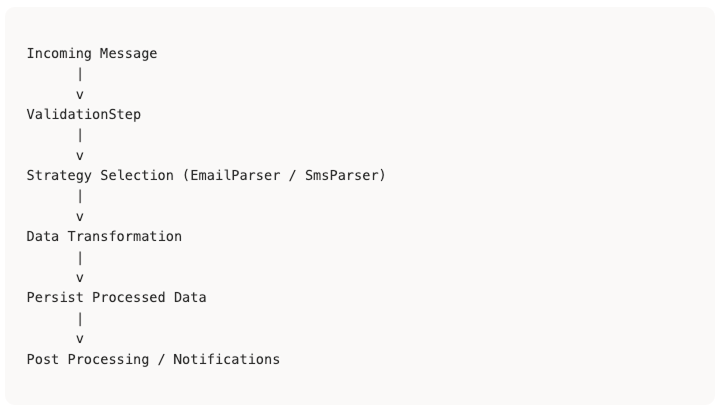
Execution process:
- ProcessingService triggers all steps.
- Each step implements the Command pattern.
- Internally, processors follow the Template Method lifecycle.
- The correct Strategy implementation is selected based on the message type.
Benefits Observed
This architecture produced several advantages during development.
Reduced merge conflicts
Developers worked on separate step implementations.
Clear ownership
Each step had a clear responsibility.
Easier onboarding
New developers could quickly understand the system structure.
High extensibility
New steps or strategies could be added without modifying existing code.
Improved readability
The workflow execution flow became easy to follow.
Why This Matters Even More in the AI Era
With the rapid rise of AI-assisted development, writing code has become significantly faster.
However, AI tools perform best when the project already has:
- clear interfaces
- strong abstractions
- predictable execution flows
When a system follows well-defined architectural patterns, AI tools can generate implementations that integrate naturally into the existing structure.
In other words:
The better the architecture, the more productive AI-assisted development becomes.
Potential Downsides and Trade-offs
While this architecture offers strong extensibility and supports parallel development, it also introduces some trade-offs that should be considered.
One downside is the increased architectural complexity. Using multiple design patterns such as Template Method, Strategy, and Command can make the system harder to understand for developers unfamiliar with these patterns. Instead of a straightforward execution flow, the logic becomes distributed across several layers of abstraction.
This approach also tends to introduce more classes and files, since responsibilities are split into multiple components such as processing steps, strategies, templates, and orchestration services. While this improves modularity, it can make the project structure heavier than necessary for simpler features.
Debugging may also become more challenging, as developers often need to trace execution through multiple architectural layers before reaching the actual business logic.
Another consideration is the higher upfront development effort required to design the abstractions and workflow structure before implementing the business functionality.
Finally, if patterns are overused, the system may suffer from over-abstraction, where the architecture becomes more complex than the problem it is solving.
For these reasons, this architecture works best in systems with complex workflows, large data processing, or multiple developers working in parallel, while simpler systems may benefit from a more lightweight design.
Advantages of This Approach
One of the main advantages of this architecture is the ability to parallelize development. By clearly defining the workflow structure and separating responsibilities through interfaces and abstractions, multiple developers can work on different processing steps simultaneously without interfering with each other.
Another important benefit is improved extensibility. New processing steps, strategies, or data types can be added with minimal impact on existing code. This makes the system easier to evolve as business requirements grow.
The architecture also promotes clear separation of concerns. Each component has a well-defined responsibility—whether orchestrating the workflow, implementing a processing step, or handling a specific data transformation. This improves code readability and maintainability.
Additionally, this structure makes the workflow more predictable and standardized. By defining the processing lifecycle through patterns such as Template Method and Command, the system ensures that all processing flows follow a consistent structure.
Finally, this approach improves testability. Since each step, strategy, and processor is isolated, components can be tested independently, making it easier to validate behavior and maintain code quality over time.
Overall, this architecture provides a strong foundation for building systems that are modular, extensible, and easier to evolve, particularly in environments where workflows are complex and development is performed by multiple engineers.
Conclusion
When implementing multi-step workflows, the biggest challenge is often not the algorithm itself, but structuring the system so teams can work efficiently together.
By combining clear package organization with patterns such as Template Method, Strategy, and Command, it is possible to design a workflow architecture that enables developers to work in parallel, keeps responsibilities well separated, and makes it easier to extend the system as new requirements appear.
In practice, successfully applying this approach also requires strong collaboration among the developers involved. During our implementation, it was important to have short daily meetings dedicated specifically to this workflow development. These meetings helped the team share challenges, align architectural decisions, and identify opportunities to reuse code between different processing steps.
Another important consideration is how the data itself is processed across the workflow. When large volumes of data are involved, careful decisions must be made about how data is iterated and passed between steps so that one stage does not become a bottleneck for the others. In some cases, parallelizing certain parts of the workflow can significantly improve performance.
Like any architectural choice, this approach also introduces trade-offs. The increased modularity and flexibility come with additional complexity and a higher initial design effort. For simpler workflows, a more lightweight solution may be sufficient.
However, when applied in the right context, especially in systems with complex workflows, evolving requirements, and multiple developers working simultaneously, this architecture can provide a solid foundation for building maintainable, extensible, and collaboration-friendly systems.
