





By Adrian Garcia (Senior Android Developer, Aequilibrium)
Local AI vs. Cloud AI: The Practical Operational Questions
Many teams experimenting with AI eventually face a practical question: should we run AI locally, or rely on cloud models? I started this project to build a small, mobile-friendly web application that could support three practical AI workflows:
- Conversational chat
- Image understanding
- Image generation
The goal was not simply to build another chat interface. The goal was to understand what it takes to run useful AI capabilities locally, what tradeoffs appear in practice, and whether local AI can reduce dependency on paid cloud services for certain workflows.
This matters because AI adoption is no longer only a technical experiment. It is also a cost, privacy, scalability, and operations question.
Teams want faster tools, lower recurring costs, better control over sensitive material, and fewer limits imposed by external platforms. This project became a practical way to evaluate those questions through a working application rather than theory.
The quiet tradeoff: convenience versus control
From Monolithic Agents to Composable Folders
Cloud AI is popular for good reasons: it is easy to adopt, it scales instantly, and, most importantly, it provides access to the latest and most powerful models. Given how quickly model capabilities improve, that access is often a material advantage for reasoning-heavy tasks, coding assistance, and multimodal workflows.
At the same time, cloud usage introduces constraints that become visible during sustained work. First, access is frequently shaped by pricing tiers, seat-based subscriptions, token costs, image generation credits, and usage limits. Second, inputs and outputs pass through third-party systems. For many workflows, this is acceptable. For others, such as client material, internal documents, proprietary code, or sensitive media, it can complicate governance and risk management.
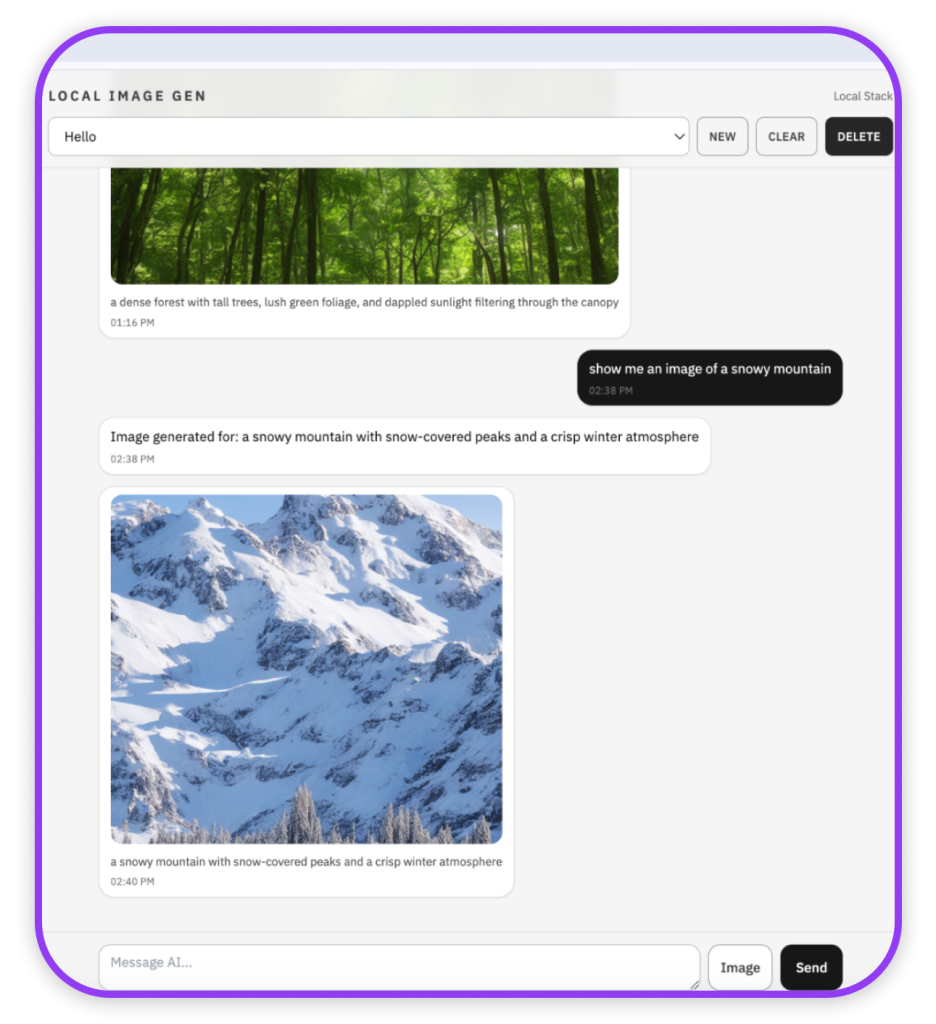
Local approaches are best understood as an option that increases control, not as a universal replacement for cloud.
Local AI improves because models are getting smaller and more efficient
Running local models shifts compute from a vendor’s infrastructure to your device or your own server. That can reduce dependency on paid cloud AI services such as hosted chat subscriptions, API token usage for language models, paid image generation credits, and cloud-based inference platforms. In other words, the savings are not from avoiding AI entirely. The savings come from replacing repeated paid calls to external AI services with inference that runs on hardware you already own or operate.
This does not mean local AI is free. You still pay for hardware, electricity, setup time, maintenance, and performance limitations. The economics become attractive when a workflow is repeated often enough, when data control matters, or when predictable internal usage is preferable to metered cloud costs. For an individual developer or a small team, local AI can reduce dependency on subscription limits and API bills. For larger companies, local AI can become more interesting when workloads are frequent, sensitive, or standardized enough to justify internal infrastructure.
One reason local AI is becoming more realistic is that models are increasingly available in optimized, smaller forms, especially through quantization. In simplified terms, many models are stored in full weight formats such as FP16 or, sometimes, FP32. Quantized variants store weights with fewer bits, often 8-bit or 4-bit, thereby reducing memory and disk requirements.
A practical rule of thumb: moving from FP16 to 4-bit can cut model size by roughly four times, with some overhead depending on the format. For example, a 4 billion parameter model stored in FP16 requires about 8 GB for weights alone, while a 4-bit version requires about 2 GB. The exact numbers vary, but the direction is consistent: quantization makes local inference feasible on more modest hardware.
Looking ahead, my view is that this efficiency trend increases the likelihood that local inference will become more common, much like how the internet expanded from PCs to an ecosystem of embedded and edge devices. This trend aligns with the incentives driving model compression and the broader push toward more efficient AI deployment.
What I built: a local AI web app in plain terms
The application was intentionally simple: a mobile-first, ChatGPT-style interface with three capabilities:
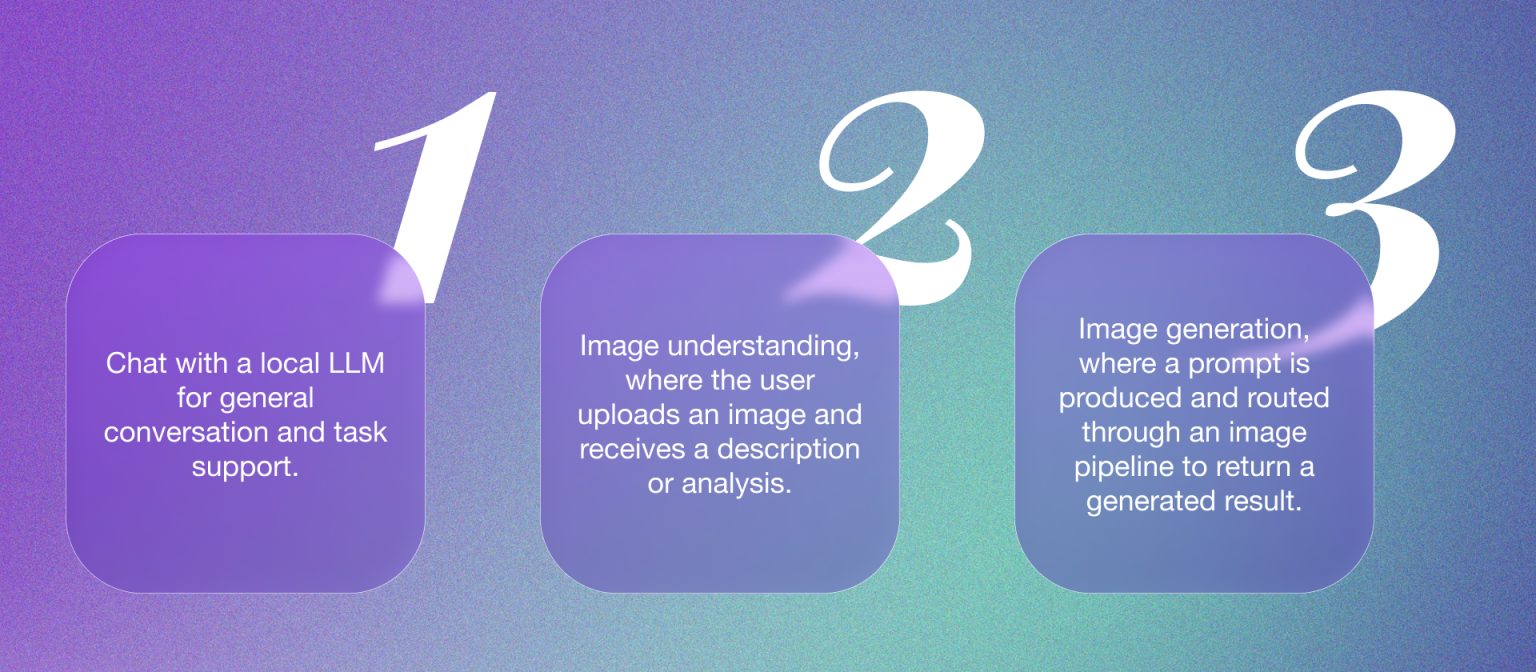
The objective was not novelty. It was a clean demonstration of a practical workflow that can run without cloud dependencies for the default path. The frontend behaves like a modern chat product, with streaming responses, uploads, and history, while the backend acts as a thin router that calls local services responsible for language and image generation.
This separation between UI, small server, local model runtime, and local image engine keeps the system understandable and makes troubleshooting more systematic.
The stack and the specific models, and why quantized matters
Two tools made the implementation practical. Ollama, which is open source and free to use, runs local language and vision models behind a simple API. ComfyUI handles image generation through a configurable workflow.
A key concept here is quantization, which allows models to run on more modest hardware. In practical terms, quantized models store their weights with fewer bits, such as 4-bit instead of 16-bit, significantly reducing memory and disk requirements. The result is that useful models can run locally on machines that would otherwise be unable to support them.
The details matter because they show how local AI becomes feasible. The vision model is quantized to reduce the footprint. The image checkpoint is FP16, which is heavier than a 4-bit LLM but still a common local compromise between quality and performance. In both cases, model choice is an engineering decision: you select artifacts that match your hardware budget and quality expectations.
Black box programming with AI, and why the latest model changed the outcome
A defining aspect of this build was the development method: I relied on AI-assisted development in a black box style. I was not reviewing every line of generated code. Instead, I specified behavior, ran the application, observed failures, and iterated until the system matched the intended flow. This resembles an experimental loop: define expectations, test outputs, refine constraints, repeat.
This style can save substantial time and money, both for individual builders and for companies. Instead of spending days wiring together boilerplate, debugging integration issues, or researching every framework detail manually, the developer can use AI to generate a working baseline and then focus on testing, product behavior, and iteration. For a company, that can mean faster prototypes, shorter discovery cycles, and fewer engineering hours spent on early experiments.
It also lowers the barrier for non-technical people to start building. A product manager, founder, designer, analyst, or operations person can describe what they want and use AI to produce a first version that would previously have required a developer from the beginning. That does not make engineering expertise unnecessary, but it does change who can participate in early software creation.
The drawback is that black box programming can reduce understanding of the code base. If the developer accepts too much generated code without review, they may not fully understand the architecture, dependencies, security assumptions, or failure modes. That risk becomes more important as the project moves from prototype to production. Black box AI coding is powerful for speed, but it needs review, testing, documentation, and ownership before it becomes reliable software.
In that context, model capability mattered substantially. I initially attempted to build using Codex, a free model with GPT 4-level capability, but it did not reliably produce a stable, working application. After switching to Codex GPT 5.3, the project progressed smoothly by comparison. The model was better at structuring the project, diagnosing integration issues, and producing coherent fixes.
The broader lesson is not that new is always better, but that AI development tooling is evolving rapidly. If your workflow depends on an assistant that can integrate moving parts, such as frontend, backend, local model runtime, and image pipeline, access to newer models can be a first-order constraint.
Conclusion: a pragmatic framework
This project supports a balanced conclusion.
Cloud AI is often the best choice when you need access to the newest and most capable models with minimal setup. It is also the simplest path to top-tier performance without owning or operating hardware. The tradeoff is ongoing cost structures and the operational reality that data passes through third-party infrastructure.
Local AI is best understood as a control-oriented alternative. It can reduce reliance on paywalls, quotas, token usage, image generation credits, and recurring cloud AI subscriptions. It can also keep certain workflows within your environment. The tradeoff is that local performance is bounded by your computing power, and you assume responsibility for setup, maintenance, upgrades, and operational reliability.
Scalability depends on the size and needs of the organization. For individuals and small teams, local AI is most useful for experimentation, private workflows, predictable, repeated tasks, and reducing dependence on subscription limits. For midsize teams, it may work well for internal tools, coding support, document workflows, or image pipelines where quality requirements are known. For larger companies, local AI can scale when there is enough usage volume, security needs, or operational maturity to justify dedicated infrastructure. However, cloud AI will still be attractive when teams need the strongest models, rapid scaling, managed reliability, and minimal maintenance.
In practical terms, teams should treat cloud AI as the default when they need the most capable models with minimal operational overhead, and local AI as the preferred option when control over data, cost predictability, or independence from external services becomes the priority.
Build Skills, Not Screens
AI is moving beyond apps and interfaces toward composable, reusable Skills. If you’re exploring how this shift impacts your product or engineering strategy, we’d love to connect.
